> For the complete documentation index, see [llms.txt](https://docs.modr8.net/llms.txt). Markdown versions of documentation pages are available by appending `.md` to page URLs; this page is available as [Markdown](https://docs.modr8.net/features/actions.md).

# Actions

Modr8 Actions let you build out simple to highly complex rules & conditions which will then output an action to be taken by your bot.\
\
Think of actions as a "If this happens, then do that" type of rule engine. There are thousands of actions you can create, you can even create sets of multiple conditions to be met for an action to be executed.

To give an idea of the type of conditions you can work with, we can trigger an action based on:

* User profile attributes
* Message attributes
* Types of media sent
* Games being sent
* Messages being received at set times
* Premium member properties
* Text patterns
* And much much much more!

<figure><img src="/files/srfKm4NBFBn7XSBiYgiV" alt=""><figcaption><p>Multiple action conditions being shown to filter down when the action outcomes will be run</p></figcaption></figure>

Once an action has had its conditions met, then you can create either a set of actions to be taken by your bot or even create groups of actions which can be randomly selected.&#x20;

Maybe you want to issue some reputation at random to users plus send out an animated image. Maybe you want to respond to users in a specific language or build out your own set of moderation commands that can be used by only users you specify. All of this is possible and much more.

To provide a list of potential actions that can be taken we've listed out just a few below:

* Send a message with personalisation
* Delete messages
* Send an image or file with a caption
* Mute / Ban / Amend reputation
* Pin messages
* Silence / Un-silence the chat
* And much more!

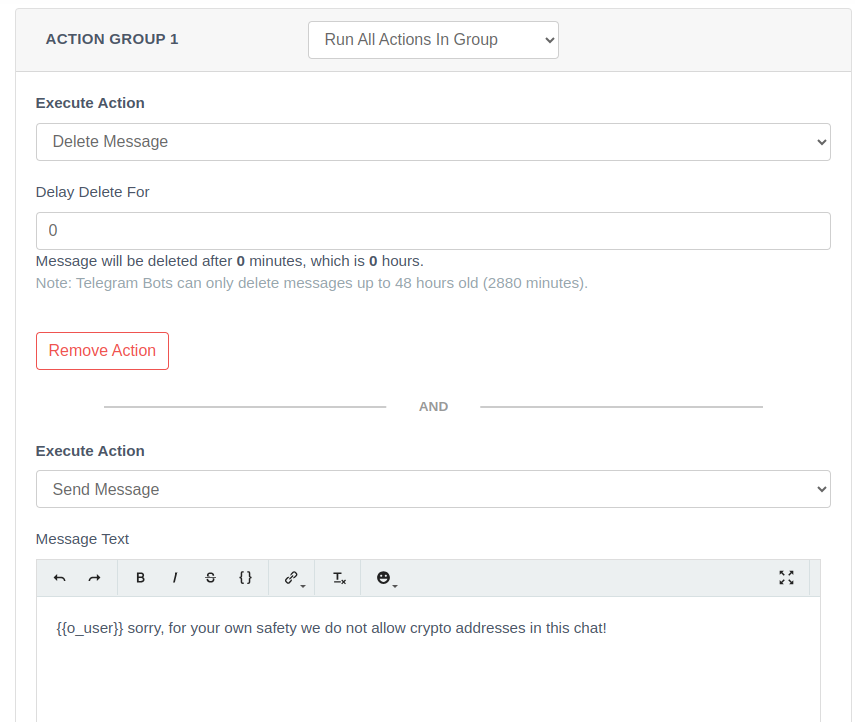
<div data-full-width="true"><figure><img src="/files/AOeLdJ3Hcrlhpsj1UgrS" alt=""><figcaption><p>Modr8 action first deleting a users message and then sending a personalised message to the chat explaining why</p></figcaption></figure></div>

If you want to find some pre-build Actions why not checkout our[ "Action Marketplace" ](https://platform.modr8.net/member/actions)where some of the best Actions have been listed from our community.<br>


---

# Agent Instructions
This documentation is published with GitBook. GitBook is the documentation platform designed so that both humans and AI agents can read, navigate, and reason over technical content effectively. Learn more at gitbook.com.

## Querying This Documentation
If you need additional information that is not directly available in this page, you can query the documentation dynamically by asking a question.

Perform an HTTP GET request on the current page URL with the `ask` query parameter, and the optional `goal` query parameter:

```
GET https://docs.modr8.net/features/actions.md?ask=<question>&goal=<endgoal>
```

`ask` is the immediate question: it should be specific, self-contained, and written in natural language.
`goal` is optional and describes the broader end goal you are ultimately trying to accomplish on behalf of the user. GitBook uses it to tailor the answer towards what is most useful for that goal.

The response will contain a direct answer to the question and relevant excerpts and sources from the documentation.

Use this mechanism when the answer is not explicitly present in the current page, you need clarification or additional context, or you want to retrieve related documentation sections.